

Qplat
Secure & Convenient Server Operation Management System with SSO and Granular Operation Privileges
Qplat is a centralized, 100% GUI-based server operation management system that makes daily server operations easier, faster, and more secure not only for system administrators but also developers and service operators.
Eliminate raw terminal input risks, streamline multi-server management with Single Sign-On (SSO), enforce granular operation privileges, and automate repetitive tasks safely with GUI components and predefined job execution features.
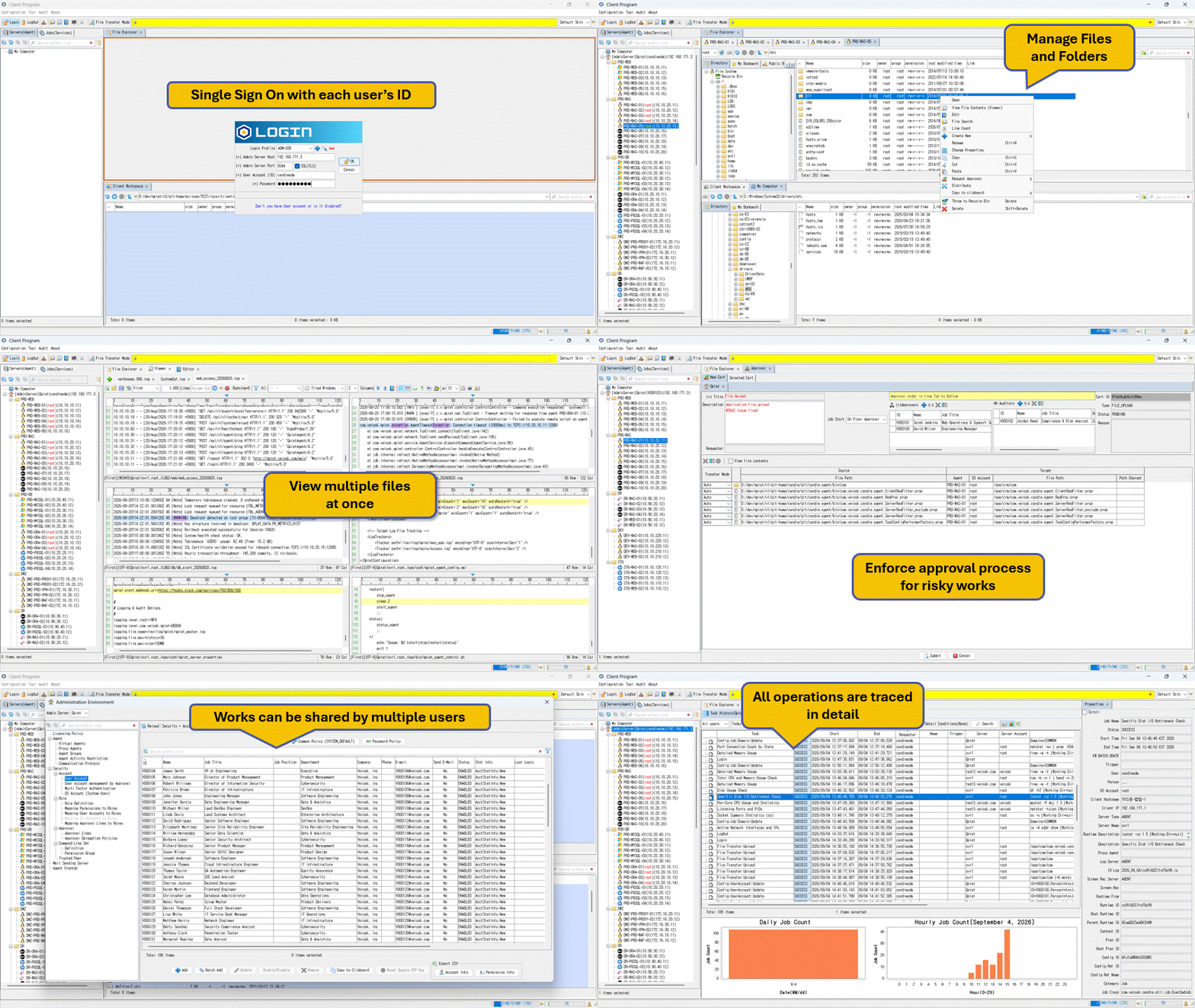
Key Features & Highlights
Intuitive GUI & Human Error Prevention
Designed to prevent human errors and unauthorized actions while enhancing operational convenience by replacing risky CLI inputs with intuitive, menu-driven GUI components.
- Single Sign-On (SSO): Access all authorized servers and perform permitted operations with a single authentication.
- Job & Workflow Automation: Execute pre-defined command-line and file transfer jobs with serial or parallel workflow.
- File System Explorer: Navigate server directories effortlessly with custom bookmarks for quick access.
- Seamless File Transfers: Upload, download, and execute direct Server-to-Server transfers using simple Drag & Drop or Copy & Paste.
- Parallel Multi-Destination Transfer: Transfer files and folders from a single source to multiple target locations simultaneously.
- Realtime Text File Viewer: View, tail, grep, and split GB-size logs and text files on-the-fly without downloading them to your local machine.
- Online Text File Editor: Edit server text files directly without needing terminal editors like ‘vi’.
- Parallel Multi-Server Search: Search file names, sizes, and internal contents across multiple servers at once.
- Built-in Trash Bin: Safeguard against accidental file deletions with immediate recovery options.
- Archive Inspection: Browse and search contents inside compressed archives (
.zip,.tar, etc.) without extraction.
Centralized Security & Governance
Safely offload even administrative tasks to users like service operators and developers based on their roles.
- Role-Based Security: Enforce fine-grained Role-Based Access Control (RBAC) and Operational Privileges without modifying target server settings, OS accounts, or file permissions.
- Stealth UI Security: Unpermitted servers, directories, files, and jobs are completely invisible on the user interface to ensure zero-trust access control.
- Enforced Approval Workflow: Enforce pre-approval workflows for high-risk operations.
- Auditing & Real-time Monitoring: Track active user sessions in real time and store centralized I/O trace logs for full compliance auditing.
Download & Setup
- Go to the Releases page and download the latest package (
.zip) file. - Extract the downloaded zip file. It contains all necessary files for installation and updates.
- Open the extracted
qplat_operation_manual.pdffile to view full instructions for installation and operation. - 💡If you want to download the latest operation manual only, click here : qplat_operation_manual.pdf
License
Qplat is currently available in 2 license types. To purchase a license, send an email to sales@velosk.com.
CE (Community Edition)
Includes most of Qplat’s core features with no limit on the number of agents.
However, a paid license purchase is required to unlock the following features:
- Multi-Factor Authentication (MFA) usage
- Task Traces: Storage and viewing of traces older than 1 week
- User Accounts: Registration and activation of more than 5 accounts (including administrators)
- ⚠️ Note: These conditions may vary depending on the version and build.
R Series
Allows unlimited user accounts.
However, licensing is required based on the number of managed servers (Admin Server and Agents).
- Server & Agent Licensing: Purchases are required for the Admin Server and each agent
according to the total number of managed servers. - Tiered Pricing: Agent pricing varies depending on the features and environments.
- Trial Period: Newly installed agents include a 3-month free trial period by default.
- ⚠️ Note: Free trial periods may vary depending on the version and build.
Documentation
Operation Manual: Download and view qplat_operation_manual.pdf (It’s also included within installation package (.zip) file)
Support & Contact
- Technical Questions, Bug Reports, or Feature Requests: help@velosk.com
- Response is not guaranteed. If guaranteed support is required,
please purchase professional technical support services. - Submitted inquiries may be copied, extracted, edited, and used for internally or disclosed externally
(e.g., FAQs, technical documentation) without prior notice.
Please do not include personal or security-sensitive information in your inquiries.
- Response is not guaranteed. If guaranteed support is required,
- License & Tech Service Purchases, Business Cooperation: sales@velosk.com
- Developed & Published By: Velosk, Inc. (http://www.velosk.com)